 Property Listing Promotion
Real estate Facebook ads: 5 examples, in the order a listing needs them
Five real estate Facebook ad examples for one listing, from coming soon to just sold, and why Meta's housing rules mean they only work in order.

You've boosted a just-listed post before. Maybe you searched for real estate Facebook ad examples first and found a gallery of twenty-four: a home valuation offer, a team photo, a lawn sign, a carousel from a portal in Dublin. Half of them sell the agent, not a house.
And the advice around them tells you to target by ZIP code, pick an age range, and build a lookalike of your past buyers. For a listing ad in the US, Meta switched off age, gender and ZIP code targeting back in 2019, and lookalikes aren't available either. The examples were written for a targeting system your listing doesn't get.
What's left works differently. Your ads for one listing have to run as a sequence, each one building the audience for the next.
What makes a real estate Facebook ad work now?
1. It runs in Meta's Housing special ad category. Meta counts a home for sale as a housing ad, so the category isn't optional.
2. The first frame does the filtering. With age, gender and ZIP code gone, the price, the place and one fact about the house decide who keeps watching.
3. Each ad feeds the next. The one precise audience you still control is people who already watched your listing video, so the just-listed ad builds the audience for the open house, the price change and the just sold.
What can't you target in a real estate Facebook ad anymore?
Age, gender, ZIP code, lookalike audiences and location exclusions are all off for housing ads that run in the US. Meta's housing ad policy names sale and rental listings as housing ads, and any advertiser in the US, or showing ads to people in the US, has to declare the Housing special ad category.
Location still works, but only broadly. Meta's audience rules for housing campaigns say a city, address or dropped pin expands to a 15-mile radius, and age is fixed at 18 to 65+ with all genders included. Some interest and behavior options disappear too, and you can't exclude any.
What the example galleries still say vs what Meta allows for a listing ad
| The advice | Allowed for a US listing ad? | What happens instead |
|---|---|---|
| Target the listing's ZIP code | No | Pick a city, address or pin; Meta widens it to 15 miles |
| Pick an age range, say 28 to 45 | No | Fixed at 18 to 65+ |
| Target one gender | No | All genders, not editable |
| Lookalike of your past buyers | No | Unavailable for housing |
| Exclude the town next door | No | Location exclusion isn't supported |
| Retarget people who watched your listing video | Yes | A custom audience you build from your own Page and Instagram views |
That last row is the one that matters. Meta still lets you build custom audiences for a housing campaign, and a video engagement custom audience is made of people who watched your video on Facebook or Instagram. You didn't pick them by age or ZIP code. They picked themselves, by watching.
Kickstarter creators can't message the people who tap "Notify me on launch" on a pre-launch page. Kickstarter emails every one of them the moment the project goes live, which is why creators spend the weeks before launch filling that list. A listing ad under Meta's housing rules sits in the same spot: you can't choose who sees it, but you can make sure the next ad reaches everyone who watched the last one.
Real estate Facebook ad examples, in the order a listing needs them
A listing needs five ads over its life: coming soon, just listed, open house, price improved and just sold. Run them in order and each one's viewers become the next one's audience, which is why the order matters more than any single ad.
The five below follow one house, and all five are illustrative: we wrote them, and neither the listing nor the ads are real. It's a four-bedroom colonial in a neighborhood we'll call Maple Heights, listed at $615,000. For real ones from your own market, see the Ad Library section below.
One listing, five ads
| Stage | What the first frame says | Who sees it | What it builds |
|---|---|---|---|
| Coming soon | Neighborhood, one feature, the Active date | 15-mile radius around the house | The first viewers, if it's a video |
| Just listed | Best room, price, neighborhood | Organic followers first, then the radius | The main viewers list |
| Open house | Day, time, street | Everyone who watched so far | Showing traffic |
| Price improved | The new price, same house | Viewers only | A second look from warm buyers |
| Just sold | Sold, the street, how it was marketed | Viewers plus the radius | Proof for the next seller |
1. Coming soon
- First frame: the front porch at dusk, text "Maple Heights · Active Thursday".
- Primary text: "Coming to Maple Heights on Thursday: a four-bedroom colonial with a screened porch and a fenced back yard. Photos and price go live Thursday morning."
- Headline: Coming soon to Maple Heights · Button: Learn more (to the listing page)
- Audience: a pin on the house; Meta widens it to 15 miles.
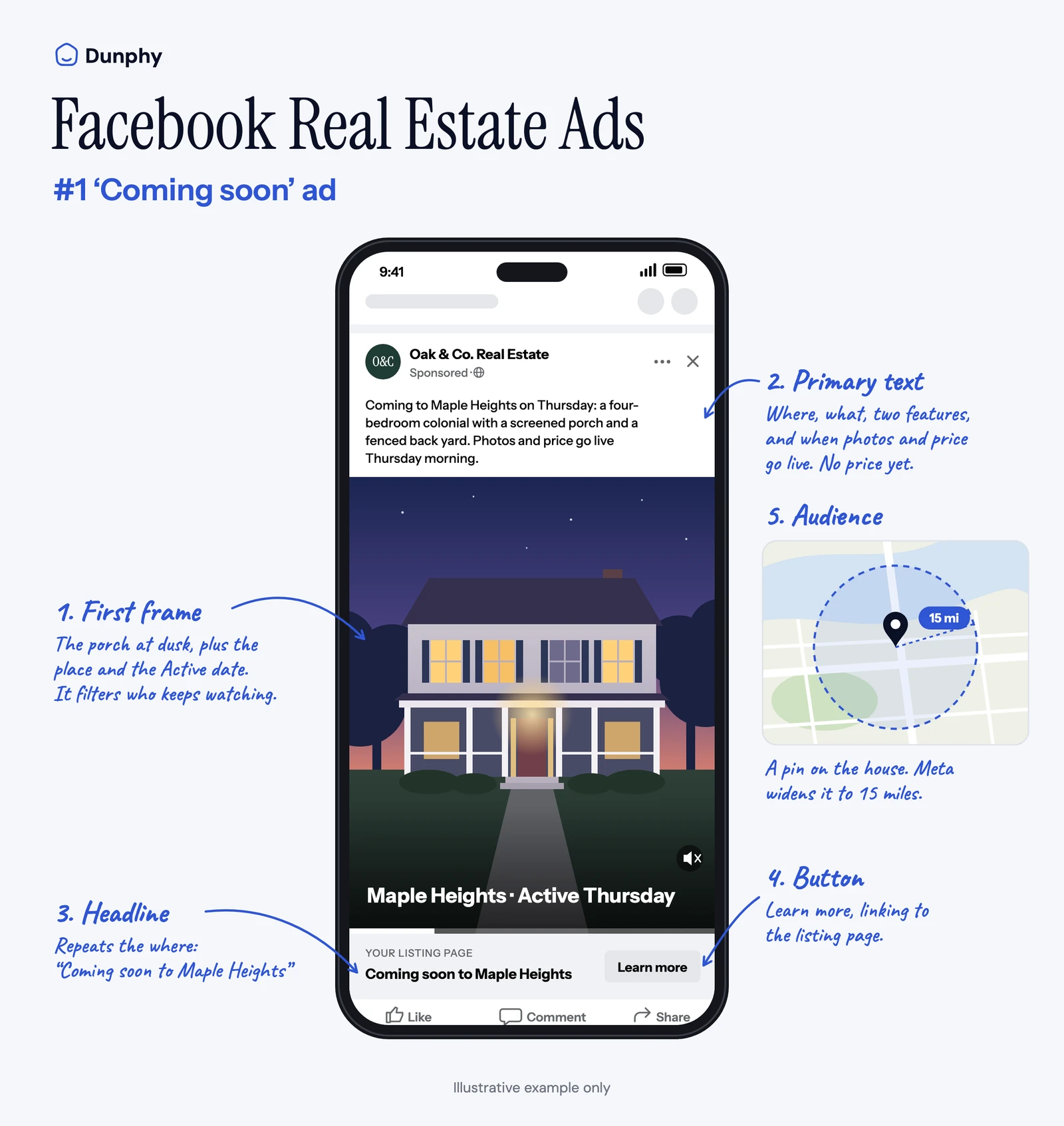
A teaser clip is better than a still here, because a video's viewers start your audience a week early. If all you have before launch is one exterior photo, run that; the viewers list will just start at the just-listed video instead.
Run this one only after the listing is in the MLS. Public marketing, a coming-soon ad included, triggers NAR's Clear Cooperation Policy, which gives you one business day to get the listing into the MLS. Enter it first, as Coming Soon where your MLS has that status, then advertise. MLS rules on coming-soon showings and how long the status can last vary, so check yours. For the clip itself, the listing teaser video covers the three-scene structure.
2. Just listed
- First frame: the kitchen, the brightest room in the house, text "$615,000 · Maple Heights".
- Primary text: "Just listed in Maple Heights. Four bedrooms, a kitchen that opens onto the screened porch, and a flat, fenced yard. Tap for the full tour and showing times."
- Headline: Just listed: $615,000 in Maple Heights · Button: Learn more
- Audience: your followers first, for free. Then the 15-mile radius, if it earns the money.
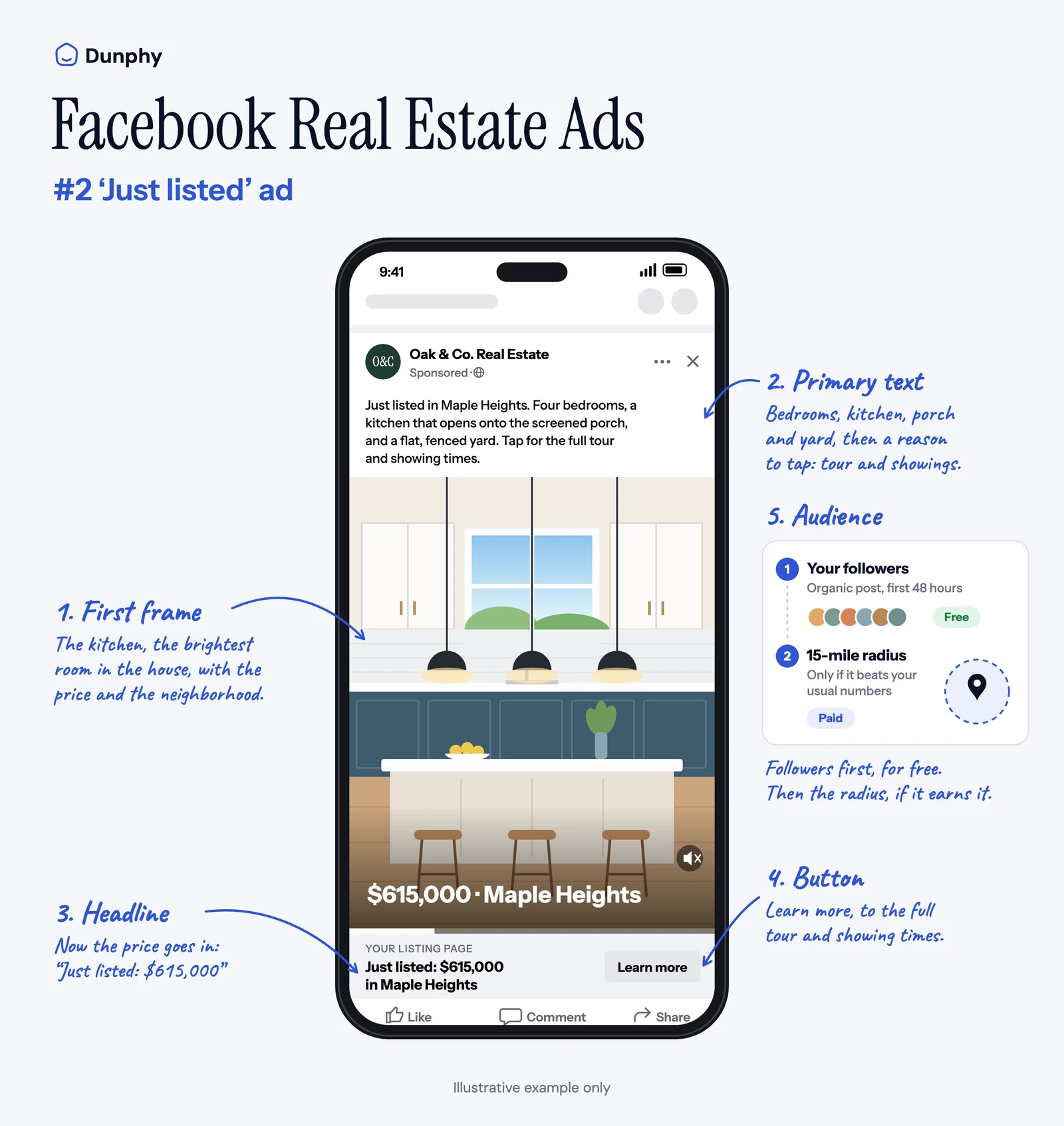
This is the ad that builds everything after it, and it shouldn't start as an ad at all. Post the listing video organically, wait 48 hours, and put money behind it only if it's beating your usual numbers, the rule we set out in how to market a property listing. The number we'd use: its 48-hour reach against the median of your last five listing videos. Above the median, boost it. Below, fix the first frame before you spend anything. A flat video with a budget behind it just reaches more people who'll scroll past. The first line of the primary text does what a caption's first line does, so the first-line rule for captions applies here too.
3. Open house
- First frame: the living room, text "Open house Sat 1 to 3 · Birchwood Lane".
- Primary text: "Open house Saturday, 1 to 3 PM, 18 Birchwood Lane, Maple Heights. Walk the porch, the yard and the kitchen in person."
- Headline: Open house Saturday, 1 to 3 · Button: Learn more
- Audience: everyone who watched the coming-soon and just-listed videos. If that audience isn't showing as Ready in Ads Manager yet, add the radius.
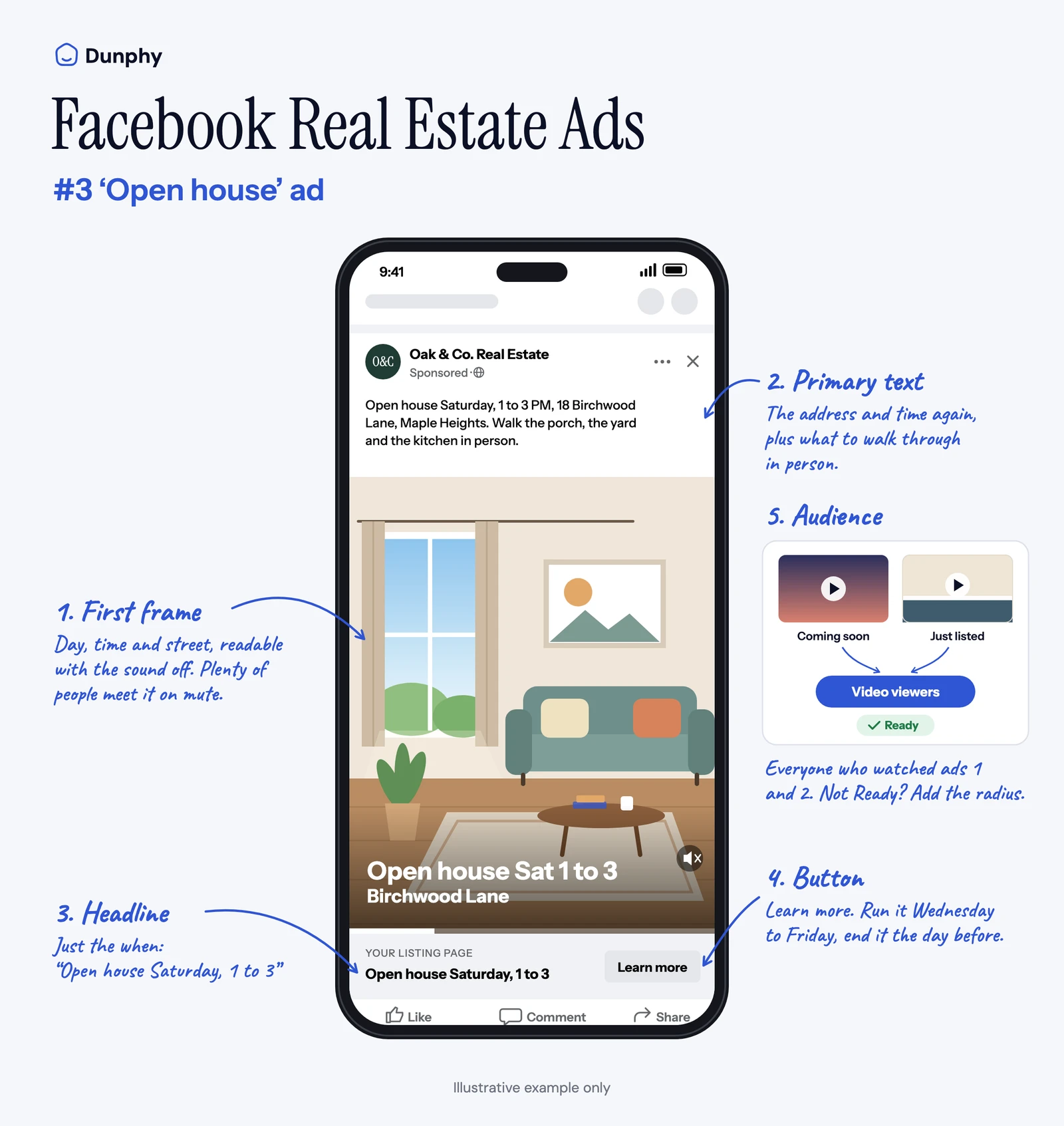
The date, time and street have to read in the first frame with the sound off, because plenty of people will meet the ad on mute. Run it Wednesday to Friday and end it the day before; by Saturday morning plans are made, as the open house promo video post argues. Aiming it at people who already watched is also why it works where a broad Marketplace open-house ad doesn't.
4. Price improved
- First frame: the same kitchen shot as the just-listed ad, text "Now $589,000".
- Primary text: "New price on 18 Birchwood Lane: now $589,000. Same four bedrooms, same screened porch, same fenced yard."
- Headline: Now $589,000 in Maple Heights · Button: Learn more
- Audience: video viewers only.
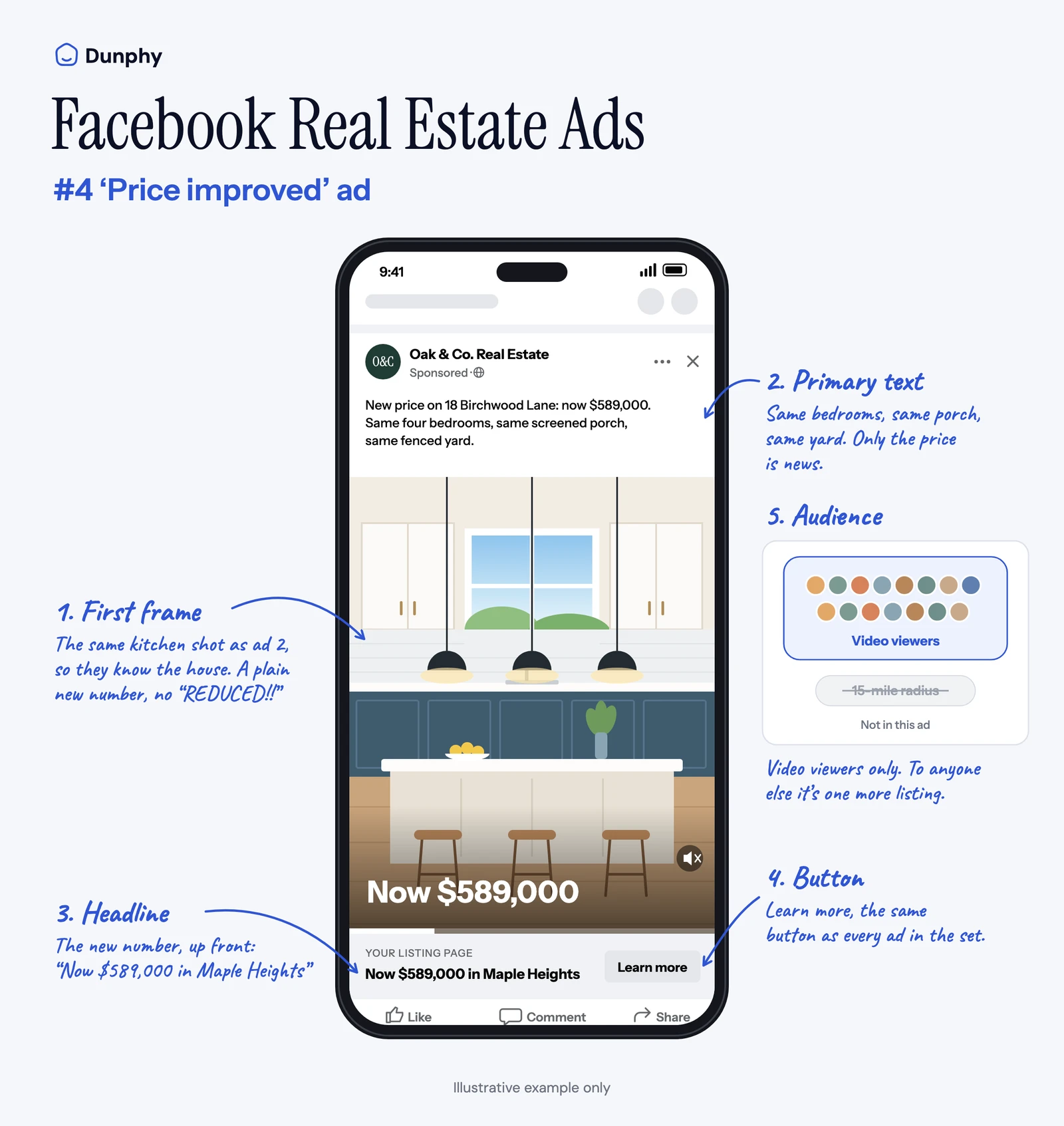
A price change is news only to people who already looked. To anyone else it's one more listing. So this ad goes to the viewers list and nowhere else, and it reuses the first frame they already saw so they recognize the house before they read the number. Skip the "REDUCED!!" graphic. A plain new number reads as confidence; the capitals read as trouble.
5. Just sold
- First frame: the front of the house, text "Sold · Birchwood Lane".
- Primary text: "Just sold: 18 Birchwood Lane, Maple Heights. Here's how we marketed it, from the first video to the open house."
- Headline: Sold in Maple Heights · Button: Learn more (to the listing video)
- Audience: viewers plus the radius.
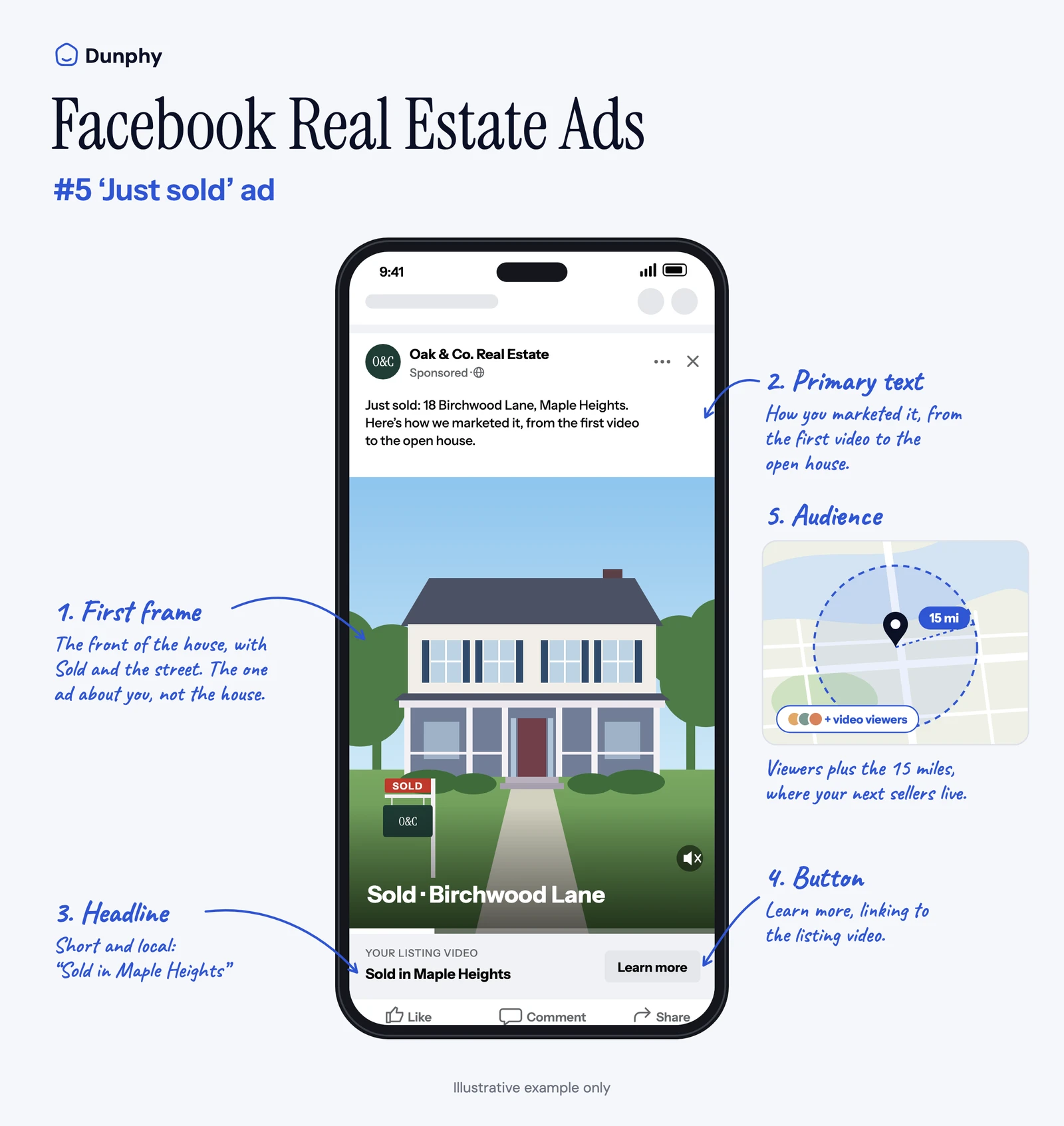
This is the one ad in the sequence about you rather than the house. The homeowners who'll list next within those 15 miles see how the last one was marketed. Ask the seller before you show the sale price, and check whether your MLS lets you advertise it. What we'd leave out is the home-valuation form most galleries attach here. That's a lead-generation ad, which is a different job with a different reputation, and it isn't what this post is about.
What should the first frame of a real estate Facebook ad say?
Price, place and one fact about the house. When Meta can't narrow the audience, the first frame decides who keeps watching, and a buyer who can't afford $615,000 or doesn't want Maple Heights should know in one second and move on.
Describe the property, never the person you imagine buying it. The Fair Housing Act covers advertising, and a line about who a home suits can signal a preference based on family status, religion or disability, even when you meant it as a compliment.
First frames and first lines, weak vs strong
| Filters nobody | Filters the right buyer | Why |
|---|---|---|
| "Your dream home awaits!" | "$615,000 · Maple Heights · 4 bed, fenced yard" | The strong version rules people in or out before they tap |
| "Perfect for a young family" | "Fenced yard, a 6-minute walk to the elementary school" | Same appeal, described as the house, and no fair-housing risk |
| Agent headshot and logo first | The brightest room first, logo at the end | A logo tells a buyer nothing about the house |
| "Won't last long!" | "Open house Saturday, 1 to 3" | A real date is urgency you don't have to invent |
How do you set up the sequence in Meta?
Declare Housing, post the video for free, turn its viewers into an audience, and point every later ad at that audience. It takes about 20 minutes the first time, and the audience keeps itself up to date after that.
We don't give a dollar figure, because the per-day budgets that circulate online don't come with a source we'd stand behind, and cost depends on your market. What we'd do instead: pick a daily amount you'd be comfortable losing entirely, run each stage for a fixed window (three days for the open house, about a week for the others), and compare what it reached with what the organic post reached for free.
- 1
Declare the Housing special ad category
In Ads Manager, turn on Special Ad Categories and choose Housing. Boosting from your Page has the same switch in its settings; turn it on there too, because a listing ad without it can be rejected.
- 2
Post the listing video organically first
Put the just-listed video on your Facebook Page and Instagram as a normal post. Give it 48 hours before you spend anything.
- 3
Build a video engagement custom audience
In Audiences, create a custom audience, choose Video, pick how much of the video people had to watch, and select the listing videos from your Page and Instagram account. Set a retention window long enough to cover the listing, say 60 days.
- 4
Point each later ad at that audience
Open house, price improved and just sold go to the viewers audience. If that audience isn't showing as Ready in Ads Manager, add the broad location until it is.
- 5
Let the audience refresh itself
Anyone who watches a later video inside the retention window joins the audience automatically, so you never have to rebuild it for the next ad.
The boost switch and the audience steps come straight from Meta's help pages on boosting a post and video engagement audiences. The 60-day window is our suggestion, not Meta's; pick whatever covers your typical time on market.
Primary text from your MLS remarks
1. Paste your MLS listing remarks into Dunphy's free MLS-to-social tool.
2. Take the first line it gives you and put the price and neighborhood in front of it. That's your just-listed primary text.
Where can you find real Facebook ads from your own market?
In Meta's Ad Library. It shows every ad currently running on Facebook and Instagram, and you can search it by any agent's or brokerage's Page name. That makes it a better swipe file than any national gallery, including the examples above, because it shows what the agents competing for your listings are running this week.
- Open the Ad Library and set the country to the United States.
- Search the Page names of the three agents who list most in your area.
- Save the listing ads, and look at their first frames and first lines against the table above.
One limit to keep in mind. For ordinary ads, the Ad Library shows the creative, the Page and the date an ad started, but not what it cost or how many people it reached. You can study how an ad is built. You can't tell whether it worked, so treat a local ad as a structure to learn from, not as proof.
Are Facebook ads worth it for a listing?
For a listing, paid is an amplifier for a video that's already working, and a poor substitute for one that isn't. That's why the sequence starts organic: the 48 hours tell you whether the video deserves a budget before you give it one.
Lead-generation ads for the agent are a different question, and several of the top replies in a long r/realtors thread on Facebook ads are about their lead quality. That's worth knowing before you mix a valuation offer into a listing's campaign.
The sequence also fits the window we think matters most. How to sell a house faster with marketing argues that days on market get set in the first 72 hours after a listing goes live, and the just-listed ad is the one that lands in them.
Where does the listing video come from?
Every ad above runs on one listing video, with a new first line and headline for each stage. Dunphy, the AI marketing agent for real estate listings, makes that video from your listing photos: a Spotlight for the listing card, a Highlight Reel for the social scroll, a Cinematic Tour for the listing page.
What Dunphy doesn't do is run the ads. Declaring the category, building the viewers audience and setting the budget all happen in Meta Ads Manager, and none of it needs a separate ads tool. Nor does Dunphy make static ad graphics; a "Sold" or "Now $589,000" card on a listing photo is a two-minute job in any design app. The part it removes is the one that usually stops the sequence before it starts: having a listing video ready on the day the listing goes live.
Frequently asked questions
How much do real estate Facebook ads cost?
Can realtors advertise listings on Facebook?
Do I need the Housing special ad category to boost a listing post?
What words are not allowed in real estate advertising?
What should a real estate Facebook ad include?
Dunphy is the AI marketing agent for real estate listings. It turns your listing photos into the video every ad in this sequence runs on, ready the day the listing goes live. Photos in. Video out.

Written by
Matthew JohnCo-founder & CEO, Typito AI
Co-founder and CEO at Typito AI. I've been dabbling with video storytelling for 15 years and every day on the journey has been exciting. At Typito we're building Dunphy — the AI video agent for real estate — alongside the broader Typito video stack. Writing here about real-estate marketing, video, and integrity in AI-generated content.