 Property Listing Promotion
How to take real estate photos with an iPhone: the settings, where to stand, and the common mistakes to avoid
iPhone real estate photography tips for agents: the camera settings, which lens to use in each room, and the mistakes that make listing photos look like phone photos.

The listing agreement is signed Monday and the listing is in the MLS as Coming Soon. Your photographer's first open slot is Thursday. You want the coming-soon post up today, so you walk the house with your phone, tap 0.5x to fit the whole room in, hold it up at eye level, and shoot.
The photos come out bright and sharp, and they still look like phone photos. The door frames lean and the bedroom looks like a hallway. None of that is the camera's fault. Modern iPhones handle most listing rooms fine. What gives a phone photo away is a few decisions made before you press the shutter: which lens you use and where you stand, how you hold the phone, and what's in the frame when you shoot.
This guide is about listing stills. If you're shooting video, our guide to shooting listing video on your iPhone has the room-by-room sequence for that.
Can you use an iPhone for real estate photos?
Yes, for most rooms and most moments in a listing. When an agent's iPhone photos fall short, the cause is usually the ultra-wide lens, a tilted phone, or something in the frame the MLS won't allow, not the sensor. A professional photographer still wins on difficult rooms and on the full gallery a seller will judge you by.
What iPhone camera settings should you use for real estate photos?
Turn on the grid and level, leave Lens Correction on, shoot at full resolution, and save your exposure setting. That's a minute of setup, once. Then lock exposure before each shot.
Set up your iPhone once, before your first listing shoot
Turn on
- Grid and LevelSettings > Camera. The level tells you when the phone is straight, which is what keeps door frames and cabinet edges vertical.
- Lens CorrectionSettings > Camera. On by default on supported models. It corrects the Ultra Wide camera so rooms look more natural. Check nobody turned it off.
- Full resolutionSettings > Camera > Formats. Use the highest resolution your model offers. You can always make a photo smaller for an upload. You can't add detail back.
- Exposure memorySettings > Camera > Preserve Settings > Exposure Adjustment, so the exposure you set doesn't reset every time you reopen the camera.
Turn off
- Live Photos and flashLive Photos add nothing to a listing still. The flash flattens a room and throws hard shadows. Use daylight and the home's own lights.
Apple documents the settings in its iPhone camera tools guide, its advanced camera settings page and its page on saving camera settings. The one habit to add on site is AE/AF Lock: touch and hold on the room (not the window) until "AE/AF Lock" appears, then drag up or down to set brightness. The exposure stays put while you recompose, so the brightness doesn't jump as you frame the shot.
How do you get the house ready before you shoot?
Spend ten minutes walking the house before you take a single photo. Most of what separates a good listing photo from a snapshot is fixed here, not in editing.
- Every light on, including lamps. Every ceiling fan and TV off.
- Blinds and curtains open. Toilet lids down.
- Counters cleared to one or two objects. Pet bowls, bins, cords and fridge magnets put away.
- Cars out of the driveway before the exterior.
- Your own yard sign down or out of frame. It's the easiest one to forget, and most MLSs don't allow signs in listing photos.
Should you use the 0.5x ultra-wide lens for real estate photos?
Not by default. Stand in the doorway at 1x first. Switch to 0.5x only when you've stepped back as far as the room allows and still can't frame it. The ultra-wide feels like the fix for "my phone can't get the whole room," and it's the lens that most often makes an agent's photo look like an agent's photo.
You'll find advice both ways. We side with 1x, for one reason. The Ultra Wide camera fits more in by bending what sits near the edges of the frame: door frames lean outward, beds stretch, and a square bedroom looks long and narrow. Apple ships a Lens Correction setting that adjusts Ultra Wide photos "for more natural-looking results," and it helps, but it can't make a wide lens behave like a normal one. A buyer who walks in expecting the room in the photo and finds a smaller one starts the showing disappointed. It's the same reason our guide to property video without a drone rules out ultra-wide shots that fake a room's size.
Amazon's rules for a product's main image say it should accurately represent the real scale of the product, on the same plain white background as every other listing, so shoppers compare like with like. A listing portal runs that same comparison, one gallery after another. A room shot at 0.5x breaks the rule Amazon writes down: it misstates the scale.
The three-wall rule is where this gets practical. Many real estate photographers try to show three walls of a room, because three walls tell the buyer the room's shape and where the window sits in it. The rule is right; the usual shortcut isn't. Switching to 0.5x in the middle of the room gets you three walls by stretching them. Backing into the doorway or the far corner at 1x gets you three walls without the stretch.
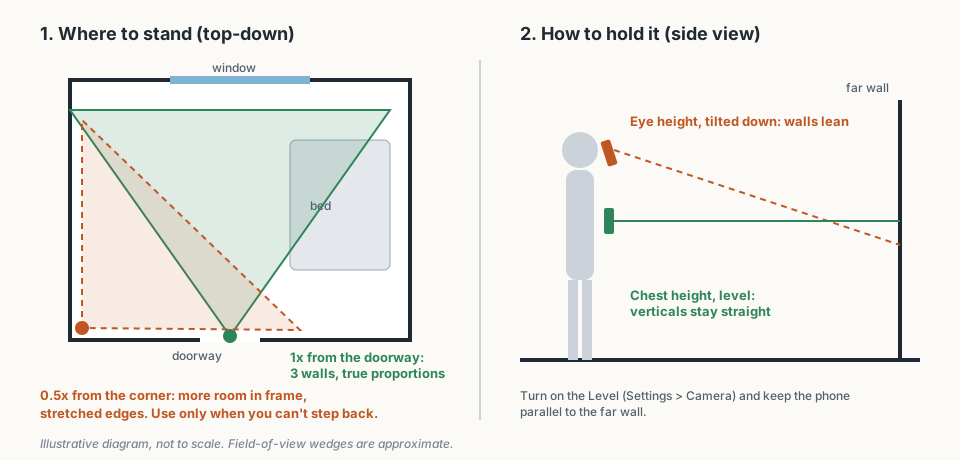
Illustrative diagram, not to scale: where to stand, and how to hold the phone.
The doorway rule, room by room
- Stand in the doorway, or back into the far corner, at 1x. If you can see three walls, shoot.
- If you can't, back into the far corner, or step back through the doorway and keep the door frame out of the edges of the shot, before you touch the lens.
- Use 0.5x only when you're physically out of room: small bathrooms, laundry rooms, narrow halls.
- When you do use 0.5x, take one straight 1x shot of the same room too, so the gallery gives buyers an honest sense of its size.
This is our recommendation, not an MLS rule.
Why do your iPhone listing photos look crooked?
Because the phone is tilted. At eye height you naturally angle the phone down to fit the floor in, and a tilted phone makes every vertical line in the room lean inward. Hold it at about chest height, keep it level, and the walls stay straight.
The level you turned on earlier does the checking for you: it shows when the phone is flat to the room. If a shot still comes out slightly off, the Photos app can adjust horizontal and vertical perspective after the fact, which Apple covers in the same camera tools guide. In a dim room, put the phone on a small tripod and use the 3-second timer, so your tap on the shutter doesn't shake the phone.
What are the most common mistakes in real estate photos?
Most weak phone listing photos trace back to one of these six, and each one is a thirty-second fix.
- 0.5x in a room that fits at 1x. Step back instead. See the doorway rule above.
- Shooting from eye height, tilted down. Chest height, phone level.
- Portrait orientation. Most listing galleries are laid out for landscape photos, and a vertical one gets cropped or boxed in. Shoot every listing photo sideways, and crop a vertical copy for Instagram afterwards.
- A white window and a dark room. Tap the room, not the window, lock exposure, and drag it up until the room looks right.
- Fans spinning and TVs on. Blur and glare. Both off.
- Things the MLS won't take. Your yard sign, your logo or phone number on the image, a person, a pet, or your own reflection in a mirror. Rules vary by board, and our guide to MLS photo requirements covers what boards actually enforce. If you add your logo for social posts, do it on a copy and keep the clean original for the MLS.
Which listing photos should you take yourself, and which should you leave to your photographer?
Who shoots what
- You, on your iPhone: the photos a buyer uses to decide whether to look closer.
- Your photographer, when the package is in budget: the gallery a seller judges you by.
That split is our recommendation, because the risk with phone photos is mostly about how they look to the seller, not image quality. Search for iPhone listing photos and forum threads with titles like "Realtor showed up with an iPhone to take photos of home" sit near the top of the results. Whatever you think of the complaint, your seller may have read it.
Who should take which photos on a typical sale listing
| Photo | Who takes it | Why |
|---|---|---|
| Coming-soon teaser shots | You, on your iPhone | Speed matters more than polish, and they come down when the full gallery goes up |
| Details and the neighborhood | You | The coffee shop on the corner, the new tile, the view from the deck. Quick, specific shots a gallery often misses |
| Open-house day and price-change refreshes | You | The listing already has its main gallery, and these keep it current |
| The main MLS gallery on a sale listing | Your photographer, when the budget allows | It's the set the seller sees first and compares to other agents' listings |
| Twilight exteriors and difficult rooms | Your photographer | Very dark rooms, bright windows, tight spaces. Their gear and editing earn the fee here |
If you do shoot in front of the seller, tell them what the photos are for. "These are for the coming-soon post; the photographer is here Thursday" heads off the question before it comes up. The same trade-off comes up for video, and our honest comparison of alternatives to hiring a videographer works through it the same way.
What should you do with the photos once you've taken them?
Upload within your MLS's deadline, then choose the few strongest shots and reuse them everywhere. The same landscape stills that go into the MLS gallery are what a listing video is built from, so a good phone set earns more than one post.
Before you upload, cull hard. Our list of which listing photos to feed into a video works for the MLS gallery too: a hero exterior, the main living space, the kitchen, the primary bedroom, the one memorable detail. From those same photos, Dunphy builds a Spotlight for the listing card, a Highlight Reel for the social scroll and a Cinematic Tour for the listing page, with no extra shoot. Your photographer's video package or your own iPhone clips do the same job, if you'd rather shoot it.
The photographer still comes Thursday. The coming-soon post went up Monday, and nobody could tell it was shot on a phone.
Frequently asked questions
Which iPhone is best for real estate photography?
What is the best app for taking real estate photos?
What is the 3-wall rule in real estate photography?
Should I shoot listing photos in ProRAW?
Dunphy is the AI marketing agent for real estate listings. You took the photos; Dunphy turns them into the right video for the listing card, the social feed and the listing page. Photos in. Video out.

Written by
Matthew JohnCo-founder & CEO, Typito AI
Co-founder and CEO at Typito AI. I've been dabbling with video storytelling for 15 years and every day on the journey has been exciting. At Typito we're building Dunphy — the AI video agent for real estate — alongside the broader Typito video stack. Writing here about real-estate marketing, video, and integrity in AI-generated content.